
What does “Error in message stream” mean in ChatGPT?
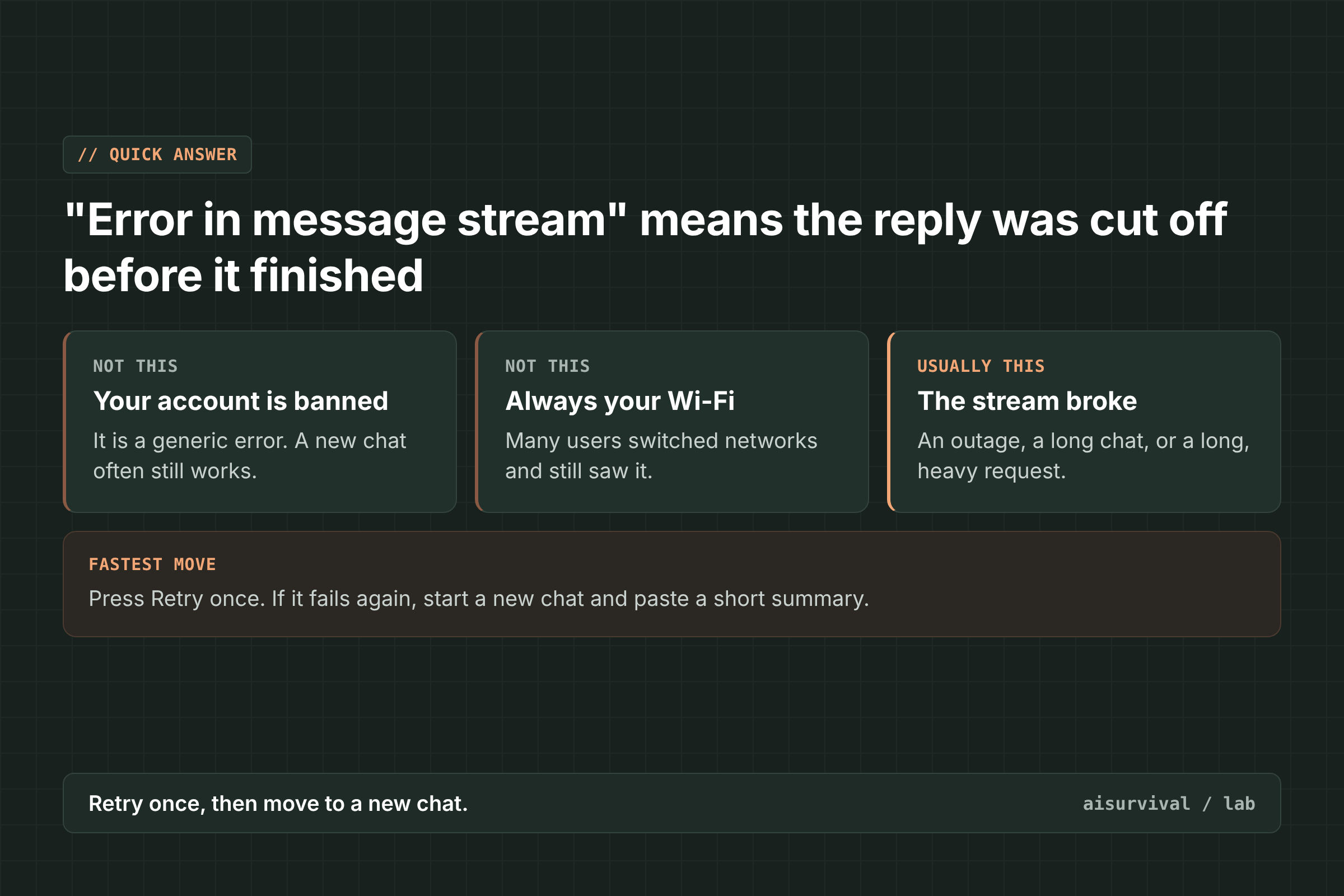
“Error in message stream” means ChatGPT’s reply stopped arriving before it was finished. ChatGPT sends its answer to you bit by bit, as a stream. When that stream breaks, you get this message and a Retry button instead of a full answer. It is not an account ban. OpenAI Support calls it a generic error with more than one possible cause. The fastest fix is to press Retry once, and if the same chat keeps failing, start a new chat and paste in a short summary of where you were.
The message has been around for a while, and reports keep coming in 2026. OpenAI’s status page has named it in an incident (June 2025). In the OpenAI community forum, users reported it on the web, the Mac and Windows apps, and Android between June and November 2026 (forum).
Below: how to tell it apart from similar errors, what causes it, six fixes in order, and how to avoid losing your work.
On this page
- Error in message stream vs. other ChatGPT errors
- What causes it
- How to fix it (6 steps)
- How to avoid losing your work
- Copy-and-paste prompt
- Limits of this guide
- FAQ
Is “Error in message stream” the same as “There was an error generating a response”?
Not quite. “Error in message stream” usually shows up after ChatGPT has started working, so the answer is cut off mid-way. “There was an error generating a response” means no answer was produced. “A network error occurred” points to your device’s connection. {“detail”:”Bad Request”} means the request for that chat was refused. “Selected model is at capacity” means the model is busy. Each one has a different best first move, so read the exact words before you try anything.
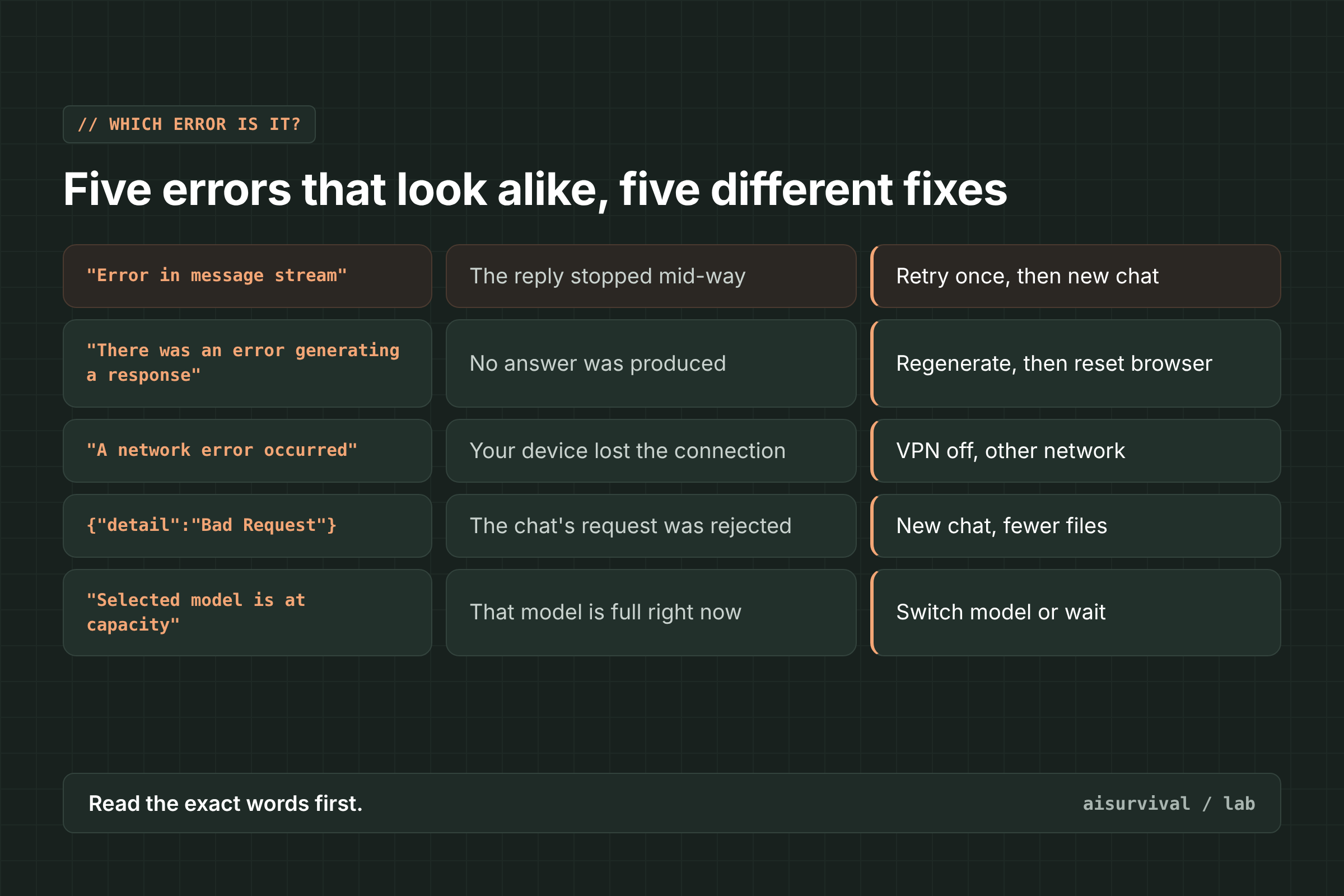
| Message you see | What it means | What to do first |
|---|---|---|
| “Error in message stream” | The reply stopped before it finished | Retry once, then start a new chat |
| “There was an error generating a response” | ChatGPT could not produce an answer | Regenerate, then reset your browser |
| “A network error occurred” | Your device could not keep a connection | Turn off VPN, try another network |
| {“detail”:”Bad Request”} | The request for this chat was rejected | New chat, fewer files |
| “Selected model is at capacity” | That model is full right now | Switch model or wait |
If every prompt in one chat returns {“detail”:”Bad Request”} instead, read our guide to ChatGPT {“detail”:”Bad Request”}.
What causes “Error in message stream”?
OpenAI has not published one cause. In a September 2026 forum reply, OpenAI Support wrote that it “is a generic error message” that “could be due to multiple reason.” User reports and OpenAI’s own pages point to a few repeat patterns.
- A service problem on OpenAI’s side. On June 11, 2025, OpenAI’s status page reported “an increase in ‘Error in message stream’ errors in ChatGPT” and said a rollback fixed it in about 25 minutes (OpenAI Status). A Mac user who saw the error on almost every chat from October 20, 2026, was pointed to a ChatGPT incident on that date (forum, OpenAI Status).
- A long chat. One user got the error right away in an old chat with 30+ requests. A new chat worked, but branching the old chat failed too. OpenAI Support replied that it had not verified a fix for that exact issue (forum).
- Long, heavy reasoning requests. A web user on GPT-5.6 Sol with High reasoning said short requests worked, but complex ones ran for a few minutes, sometimes over 17, and then failed. Switching to a phone hotspot did not help (forum).
- Work mode. In August 2026, users said every model in Work mode got stuck on “Thinking” and sometimes ended with this error, while normal chats worked (forum).
- Long chats with attachments (Android). One Android user saw it in a long chat after sending a text file and a screenshot. They said they could not tell whether length, attachments, or the network caused it (forum).
Your own internet is not always the reason. Several users switched networks, browsers, or devices and still saw the error.
How to fix “Error in message stream” (6 steps)
To fix “Error in message stream,” go through these steps in order and stop at the first one that works: retry once, check OpenAI’s status page, start a new chat, make your request smaller, reset your browser or app session, and report it to OpenAI with a HAR file if it keeps happening.
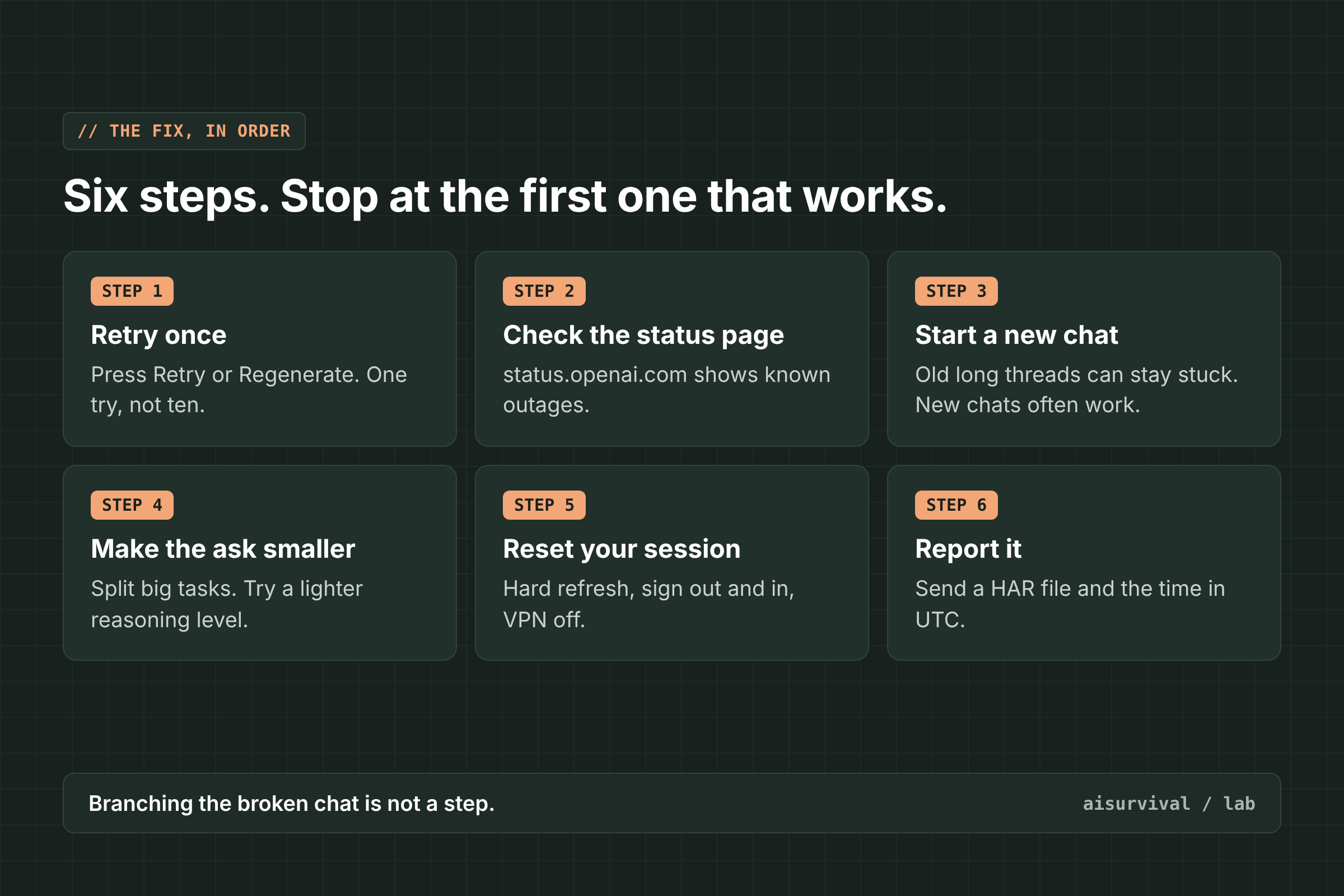
1. Retry once
Press Retry or Regenerate under the failed reply. OpenAI’s help page says a failed response “may be a one-time error” (OpenAI Help Center). If it fails again right away, move on. Ten retries in the same chat rarely help.
2. Check the status page
Open status.openai.com. If there is an open ChatGPT incident, nothing on your side will fix it. Save your prompt somewhere safe and try again after the incident is marked resolved.
3. Start a new chat
If only one old chat fails, leave it. In the forum report above, a new chat worked when the old one did not. OpenAI’s help page also says to start a new chat “if the conversation is long or has many turns.” Copy the goal, the latest version of your work, and any rules into the new chat with the prompt below. Do not branch the broken chat: that user said branching failed too.
4. Make the request smaller
If the error shows up only on big tasks, split the task into parts. If you use a high reasoning level, try a lower one for that step. In the GPT-5.6 Sol report, short requests worked while long, complex ones failed after several minutes.
5. Reset your session
OpenAI’s help page lists these steps for a reply that hangs or fails: hard refresh (Cmd/Ctrl + Shift + R) or reload the desktop app, sign out and back in, open ChatGPT in a private window with extensions off, turn off VPNs, proxies, or secure DNS, and try another browser, network, or device (OpenAI Help Center). Update the app to the latest version too.
6. Report it
If it keeps happening across browsers, devices, and networks, contact OpenAI Support. In the forum, OpenAI Support asked users for a HAR file (a browser log of the failed request) and the time in UTC. The help page also asks for console errors, the model you used, and the chat link or ID.
What usually does not help
- Retrying over and over in the same long chat. In reports, the old chat kept failing while new chats worked.
- Branching the broken chat. One user said a branch failed the same way.
- Clearing cache and cookies alone. The same user tried this first, and it did not help. It is still worth one try in a browser.
- Reinstalling the app during an outage. A Mac user reinstalled the app and restarted the router, but the error stayed until the service side was fixed.
How do I avoid losing my work to “Error in message stream”?
Keep each chat to one task, split big requests into smaller steps, and save a short handoff note outside the chat. If a reply gets cut off or a chat stops working, you paste the note into a new chat and keep going in a minute.
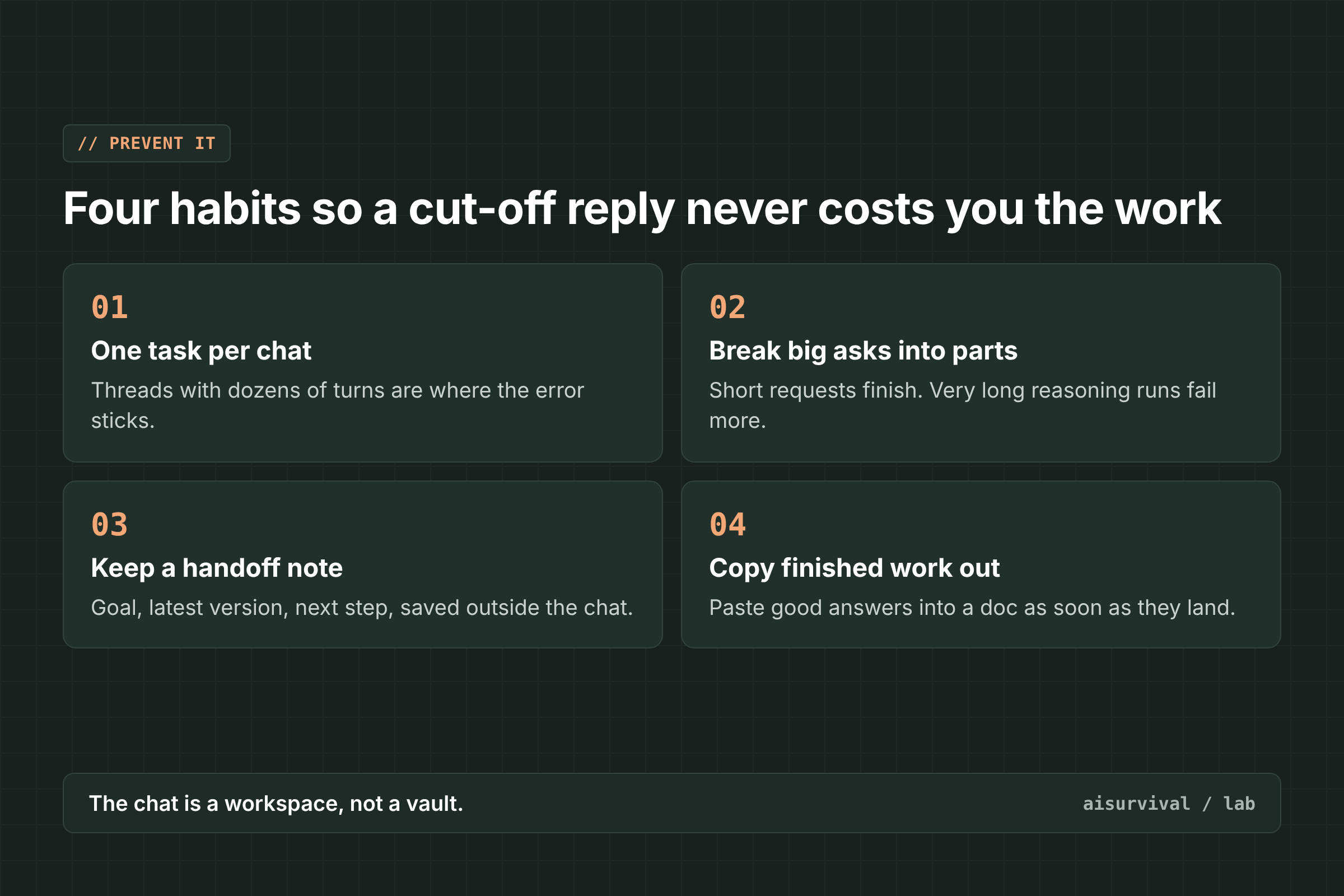
- One task per chat. Long threads with dozens of turns are where the error tends to stick.
- Break big asks into parts. Short requests finished in the reports. Very long reasoning runs failed more often.
- Keep a handoff note. Goal, latest version, decisions, next step. Save it before you need it.
- Copy finished work out. Paste good answers into a doc or notes app as soon as they land.
Copy-and-paste prompt
Use this in a new chat when the old one keeps showing “Error in message stream.” Replace anything in [brackets] with your own details.
Prompt: Continue in a new chat, one step at a time
My last chat kept failing with "Error in message stream," so I am moving the work here.

Goal: [one sentence]
Latest version: [paste it]
Rules: [tone, format, things to avoid]

Please do this in small steps. Do only step 1 now: [first small part of the task]. Stop after step 1 and wait for my OK before you continue.
Limits of this guide
- We did not reproduce this error on purpose. The causes and fixes come from OpenAI’s status page, OpenAI’s help center, and user reports in the OpenAI community forum.
- OpenAI has not confirmed a single cause. The links to long chats and long reasoning runs are patterns in user reports, not an official rule.
- The step 5 checklist comes from OpenAI’s general troubleshooting page, which does not name this exact message.
- Apps change fast. We checked these reports on November 14, 2026.
FAQ
Does “Error in message stream” mean my account is banned?
No. It means one reply broke before it finished. If a new chat works, your account is fine.
Is it my internet connection?
Sometimes, but often not. Several users switched to a phone hotspot or another device and still saw it. Check status.openai.com and try a new chat before you spend time on your router.
Why does a new chat work when the old one keeps failing?
OpenAI has not explained it. In user reports, long chats with many turns failed while fresh chats worked, which is why a new chat is the fastest fix for a stuck thread.
Do I lose the answer when this happens?
You may not get the full answer back from that attempt. Copy your prompt before you retry, so you can paste it into a new chat if the old one keeps failing.
Keep going
This post is part of our AI Tool Fixes series on working as a team of one with AI as your teammate. For related errors, see ChatGPT {“detail”:”Bad Request”}: why it happens + 6 fixes, “Could not load this ChatGPT conversation”, and “Selected model is at capacity”.
Your turn: Where do you see “Error in message stream” most, on the web, the desktop app, or your phone? Tell us in the comments.
Sources
- OpenAI Status: ChatGPT errors (Error in message stream), June 11, 2025
- OpenAI Status: Degraded performance in ChatGPT, Codex, and APIs, October 20, 2026
- OpenAI Help Center: Troubleshooting ChatGPT error messages
- OpenAI Community: Keep receiving “Error in message stream” (June 2026, OpenAI Support reply September 2026)
- OpenAI Community: GPT-5.6 Sol (High Reasoning) fails with “Error in message stream” (September 2026)
- OpenAI Community: Work Mode stuck on “Thinking,” shows “Error in message stream” (August 2026)
- OpenAI Community: ChatGPT Android “Error in Message Stream” interrupts long conversations (September 2026)
- OpenAI Community: Error in message stream, ChatGPT app and browser (October 2026)