
What is card sorting, and how do you run one?
Card sorting is a UX research method where people group labeled cards (one topic or page per card) in whatever way makes sense to them. It shows you how your users expect your menu or site to be organized.
In an open sort, people make and name their own groups. In a closed sort, they put cards into groups you already named.
For most product managers and UX designers, the useful version is an online open sort with 30 to 50 cards and about 15 people, plus a few short sessions where you ask why.
AI can help you write the cards and read the results. It can’t do the sorting for your users.
Series: UX Research Methods, from the textbook to real work. This is #2.
On this page
- Where card sorting came from
- Open vs. closed vs. hybrid
- How many people you need
- The textbook version vs. what teams actually do
- How to run a card sort in six steps
- Where AI helps, and where it misleads
- Copy-and-paste prompts
- Example (fictional)
- Limits
- FAQ
Where did card sorting come from?
Card sorting started in psychology, long before anyone built a website. A 2005 paper in the journal Expert Systems traces card sorts back to psychologist George Kelly’s Personal Construct Theory, which rests on a simple belief: different people categorize the world differently (Fincher & Tenenberg, 2005). Researchers later used sorting to pull out how experts organize what they know.
Then it moved into web design. In 1994, Jakob Nielsen used it to design SunWeb, Sun Microsystems’ internal website. The team wrote 51 services on notecards, four users sorted them into piles and named the piles, and the result became the 15 groups on the home page (NN/g). Today NN/g defines it as “a research method in which study participants place individually labeled cards into groups” (NN/g, 2024).
Open vs. closed vs. hybrid: which card sort should you run?
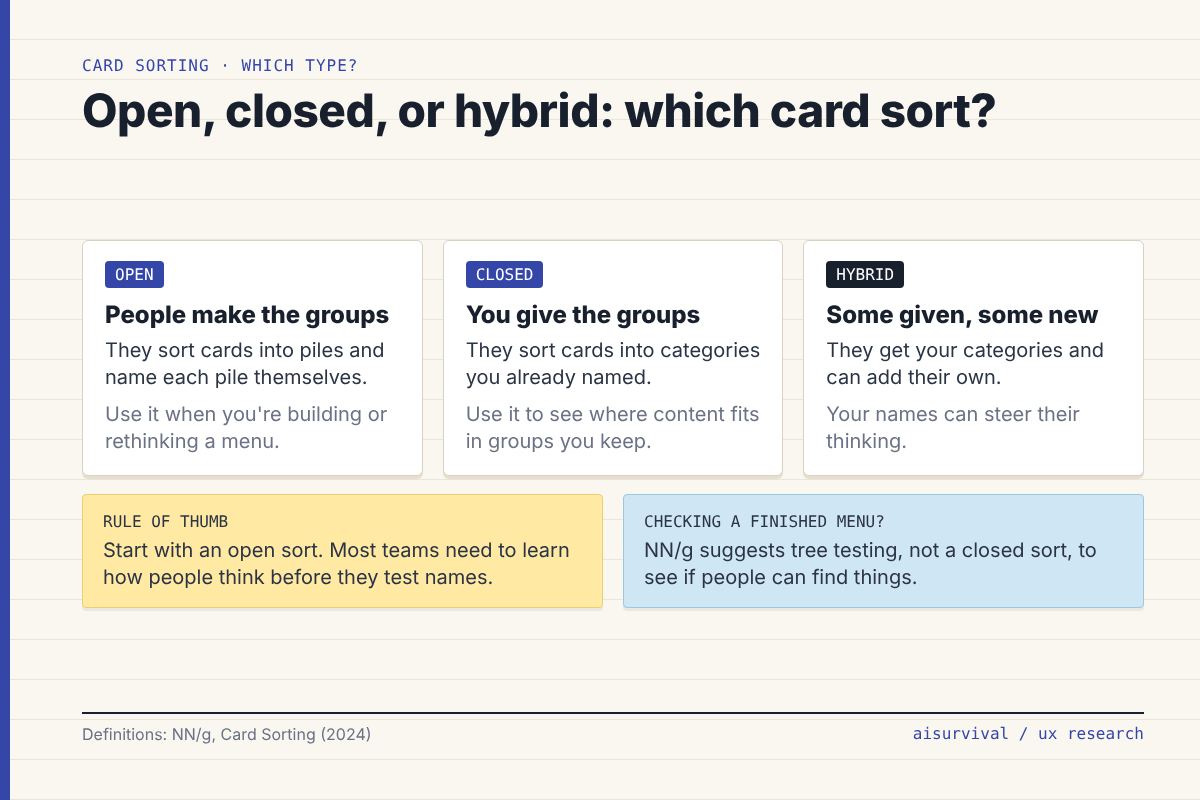
The difference is who names the groups. In an open sort, people make their own groups and name them. That’s the most common type, and it’s the one to run when you’re building or rethinking a menu. In a closed sort, you hand people your category names and they decide where each card goes. A hybrid sort gives them your categories but lets them add new ones.
NN/g generally advises against hybrid sorts, because your category names can steer how people think. And if what you really want to know is “can people find things in this menu?”, NN/g says tree testing usually does that job better than a closed sort. So start open. You’ll learn your users’ words before you lock in yours.
How many people do you need for a card sort?
More than you’d think. If you read #1 on usability testing, you saw that five users per round is the usual rule there. Card sorting is different. In 2004, Tom Tullis and Larry Wood ran a card sort with 168 users, then pulled smaller random samples from that data to see how closely each matched the full result. Nielsen summed it up: five users matched at a correlation of only 0.75, while 15 users reached 0.90 (NN/g, 2004).
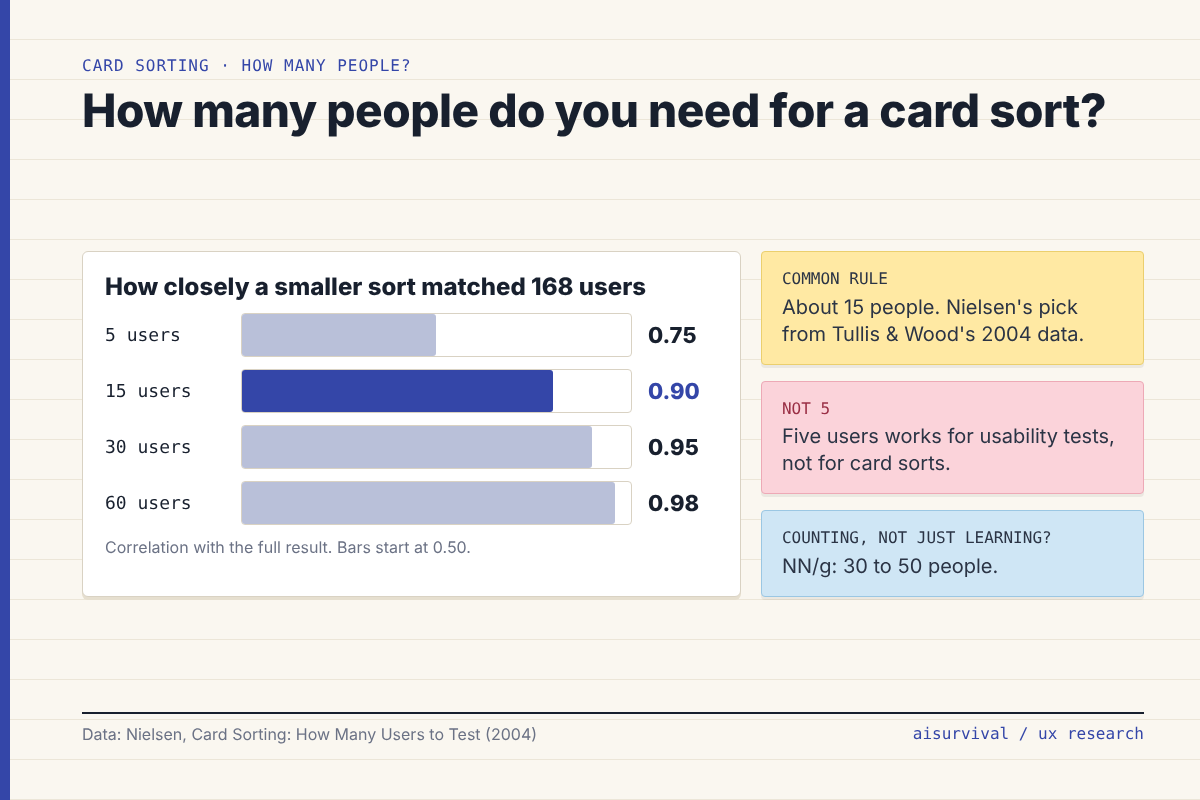
His advice: “test 15 users.” Tullis and Wood themselves suggested 20 to 30, and Nielsen chose 15 so the rest of the budget could go to usability tests. NN/g’s newer guidance splits it by goal: at least 15 people if you want to understand why people group things, and 30 to 50 if you want solid numbers (NN/g, 2024).
The textbook version vs. what teams actually do
In class, card sorting looks like paper cards on a table, a moderator asking “why did you put these together?”, and a cluster analysis that ends in a tree diagram (a dendrogram). At work, it’s usually an online tool where people sort alone, plus a spreadsheet and a similarity matrix, which is a grid showing how often each pair of cards landed in the same group.
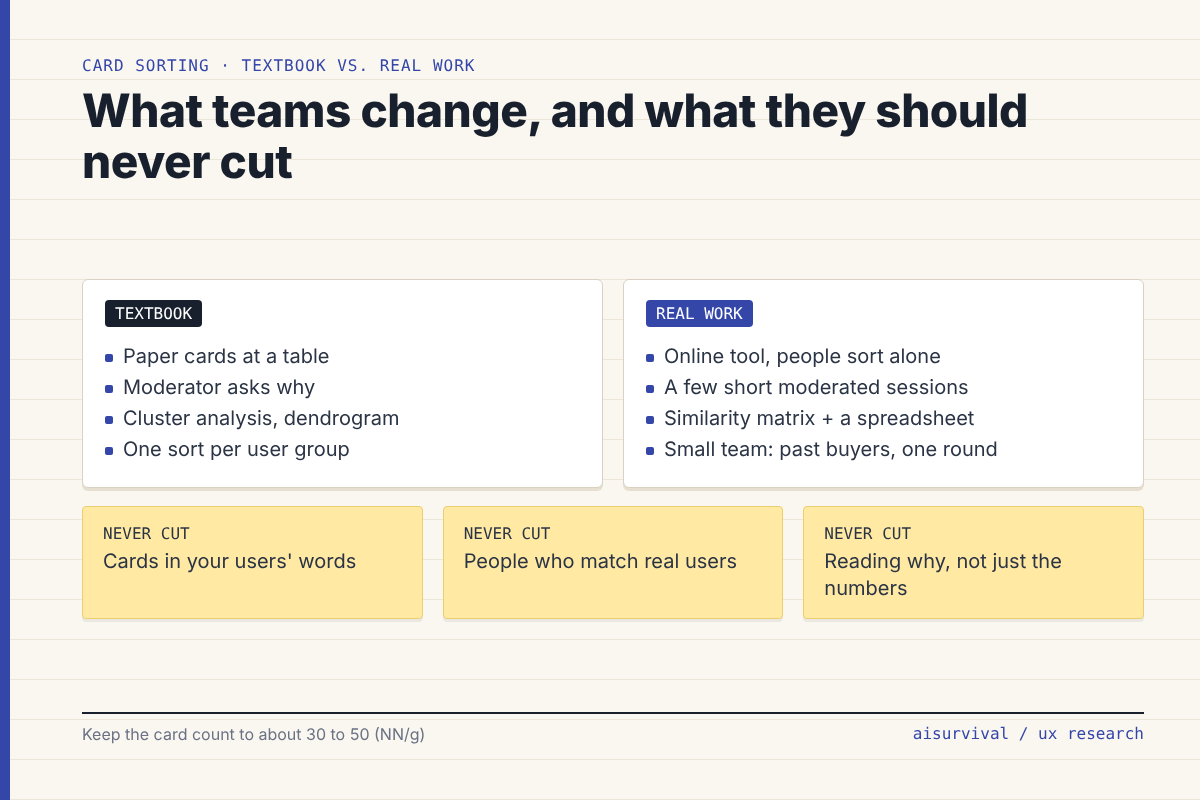
Going online is fine. What you lose is the why, so get it back cheaply: NN/g suggests running a few moderated sessions even when the main study is unmoderated. And don’t build a menu straight from the numbers. Nielsen’s own warning: “I don’t recommend designing an information architecture based purely on a card sort’s numeric similarity scores.”
Large company: a UX researcher runs the study in a paid tool, recruits from a panel, and sorts by user group (say, new vs. returning customers).
Small team: the product manager or designer runs one open sort with past customers or newsletter readers, then talks to three of them for 15 minutes each.
How do you run a card sort in six steps?
- Name the decision. “How should we group the shop menu?” is a decision. “Learn how users think” isn’t.
- Write 30 to 50 cards. One page, product, or topic per card. Use the words your users use, and avoid labels that share a word with each other, because people will match words instead of meaning.
- Pick the type. Open if you’re building or rethinking. Closed only if your categories are fixed and you want to see what fits where.
- Recruit about 15 people who match your real users. Coworkers know your org chart, so they’ll sort by it.
- Run it. Online and unmoderated for most people, plus two or three short calls where someone sorts while thinking aloud.
- Analyze, then decide. Look at which cards often land together, which cards float between groups, and what people named their groups. Draft a structure, then check it with a tree test before you build.
Where does AI help a card sort, and where does it mislead?
AI is handy on both ends of a card sort. The middle still belongs to people.
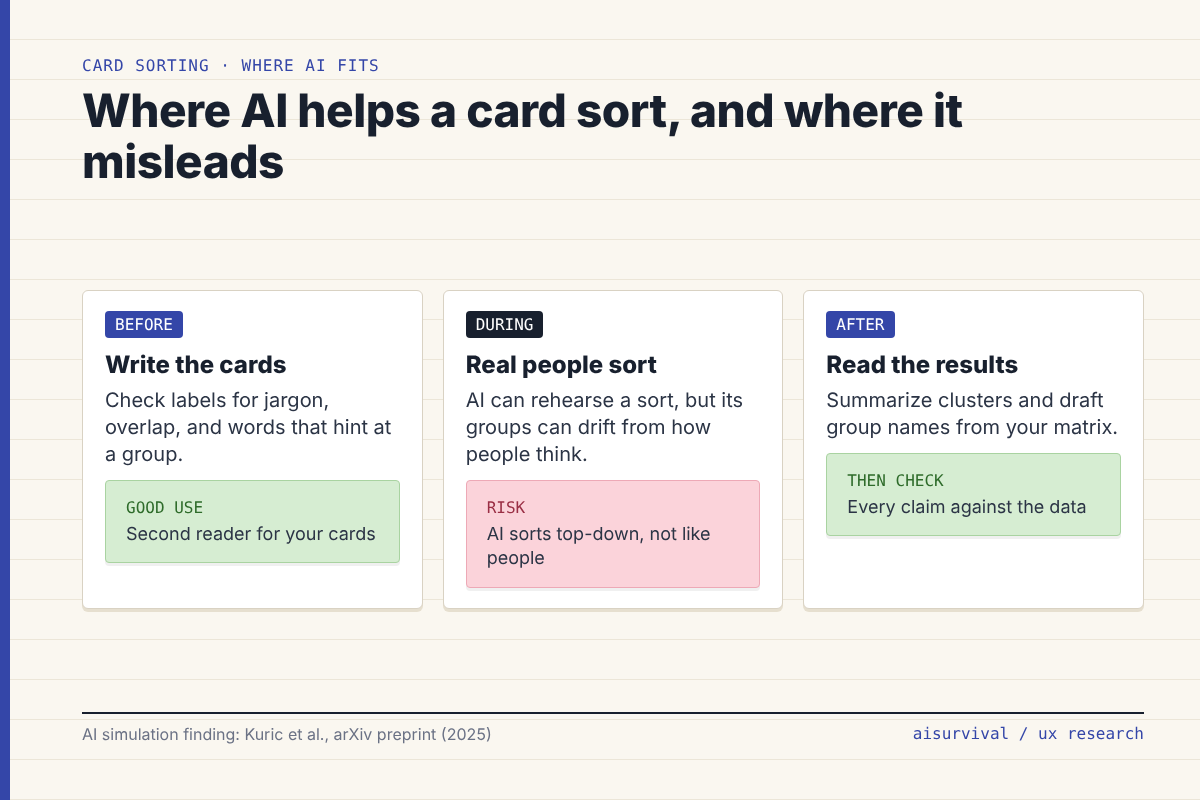
- Before: AI makes a good second reader for your card labels. It can flag jargon, near-duplicates, and labels that give away a group because they share a word.
- During: can an AI just do the sort? A 2025 research preprint (not yet peer reviewed) compared AI-simulated card sorts with 28 real studies covering 1,399 participants. The AI’s groups agreed with real results to a good degree overall, but its similarity matrices didn’t match human mental models, which the authors put down to the AI’s “top-down” way of sorting. Accuracy also dropped as the number of cards and the complexity of labels went up (Kuric et al., 2025). Fine for a rehearsal before you launch the study. Not a stand-in for your users.
- After: paste your similarity matrix or a pair-count table and ask AI to describe the clusters and suggest group names, using your participants’ own labels. Then check every claim against the data. If the AI says “most people grouped X with Y,” the number should be right there in your table.
Copy-and-paste prompts
Replace anything in [brackets]. Remove names and personal details before pasting participant data into an AI tool.
Prompt 1: Check your cards before the sort
I'm planning an open card sort.

Product: [what it is]
Who will sort: [short description of real users]
Decision this sort should inform: [one sentence]

Here are my cards, one per line:
[paste card labels]

Review the cards and give me a table: Card | Problem | Suggested label
Flag these problems:
- jargon or internal names a customer wouldn't use
- two cards that mean almost the same thing
- cards that share a word, so people might group them by the word instead of the meaning
- cards that are too broad to place in one group

Don't suggest categories or groups. I want to learn those from the participants.
Prompt 2: Read the results after the sort
Below are results from an open card sort with [number] participants.

Part A is a pair table: Card A | Card B | Number of participants who put them in the same group.
Part B is every group name participants created, with the cards in each group.

1. List the clusters of cards that were often grouped together. For each cluster, give the pair counts that support it.
2. List cards that were split across many groups. These are the hard ones.
3. For each cluster, suggest 2 names, using words that participants actually used in Part B. Quote the participant labels you based them on.

Rules:
- Only use the data below. If something isn't supported by a number, say so.
- Don't design the final menu. I'll do that after a tree test.

Part A:
[paste pair table]

Part B:
[paste group names and cards]
Example (fictional)
Everything here is made up for illustration.
The printable planner shop from the usability testing guide fixed its download page. Now the owner wants to clean up the shop menu, which is split into “Planners,” “Inserts,” and “Bundles.” That’s how she makes the files. Is it how buyers look for them?
She writes 36 cards, one per product (“Weekly budget tracker,” “Meal plan with grocery list,” “Undated monthly calendar,” and so on), runs Prompt 1, and renames five cards that used her internal file names. Then she sends an open sort to 15 past buyers and talks to three of them on short calls.
Almost nobody makes a “Bundles” group. Most people sort by what they’re planning: money, meals, school, and the week ahead. One card floats everywhere: “Habit tracker” lands in four different groups. On a call, one buyer says she’d look for it “wherever the weekly stuff is.” So the owner drafts a menu by use, with “Habit tracker” under weekly planning, and plans a tree test before she changes the live shop.
Quick checklist:
☐ You wrote down the decision this sort informs.
☐ You have 30 to 50 cards, written in your users’ words.
☐ No two cards share a giveaway word.
☐ You chose open unless your categories are truly fixed.
☐ About 15 people who match real users, plus a few “why” sessions.
☐ Every AI summary is checked against your pair counts.
☐ You’ll test the new structure before you build it.
Limits
- Card sorting shows how people group things. It doesn’t tell you whether they can find things in your final menu. That’s a job for tree testing.
- The 15-user rule comes from one large study (Tullis and Wood, 2004). Nielsen himself noted that data from more companies would be better.
- Cards strip away context. People sort labels, not real pages with pictures and prices, so groups can shift once the real site is in front of them.
- The AI simulation study we cite is a preprint built around a prototype tool, and the authors call for more research.
- The planner shop example is fictional. Follow your company’s rules and local law on participant data.
FAQ
What’s the difference between open and closed card sorting?
In an open card sort, participants create and name their own groups. In a closed card sort, they place cards into categories you already named. Use open to learn how users think about your content. Use closed only when your categories are fixed.
How many participants does a card sort need?
About 15 is the common rule, from Nielsen’s 2004 analysis of Tullis and Wood’s data. NN/g now suggests at least 15 for qualitative insight and 30 to 50 if you want reliable numbers.
How do you analyze card sorting results?
Look at a similarity matrix (how often each pair of cards was grouped together), find the clusters, spot the cards that got split across groups, and read the names people gave their groups. A dendrogram from cluster analysis helps on bigger studies. Then check your draft structure with a tree test.
Can AI do card sorting for you?
It can rehearse one, but it isn’t your users. In a 2025 preprint, AI-simulated sorts broadly matched real results but didn’t match how people actually think about which cards belong together. Use AI to check your cards and summarize results, and have real people do the sorting.
More UX research: start with usability testing with 5 users (#1 in this series). For finding out what customers already say, see how to analyze customer reviews with AI. For the bigger picture, see the product management process guide.
Next in UX Research Methods (one new method every Tuesday): heuristic evaluation, Nielsen’s 10 heuristics as a checklist, with AI prompts.
Your turn: Have you ever run a card sort, or inherited a menu that clearly skipped one? Tell us in the comments. Your answers shape future guides.
Sources
- NN/g: Card Sorting: Uncover Users’ Mental Models for Better Information Architecture (Tankala & Sherwin, 2024)
- NN/g: Card Sorting: How Many Users to Test (Nielsen, 2004)
- NN/g: 1994 Design of SunWeb: Sun Microsystems’ Intranet (Nielsen)
- Fincher & Tenenberg: Making Sense of Card Sorting Data, Expert Systems 22(3), 2005 (PDF)
- Kuric, Demcak & Krajcovic: Card Sorting Simulator, arXiv preprint (2025)
Leave a Reply